Many small and mid-sized businesses don’t run on a single cloud. The platform or web shop lives on AWS, while a few servers or applications run in Azure. Looking at security then means two consoles, two kinds of alerts and asking twice: what actually matters here?
In July 2026, AWS announced that Security Hub now checks Microsoft Azure as well. Below is exactly what was announced, with the source. After that, our view on what you can do with it.
What was announced?
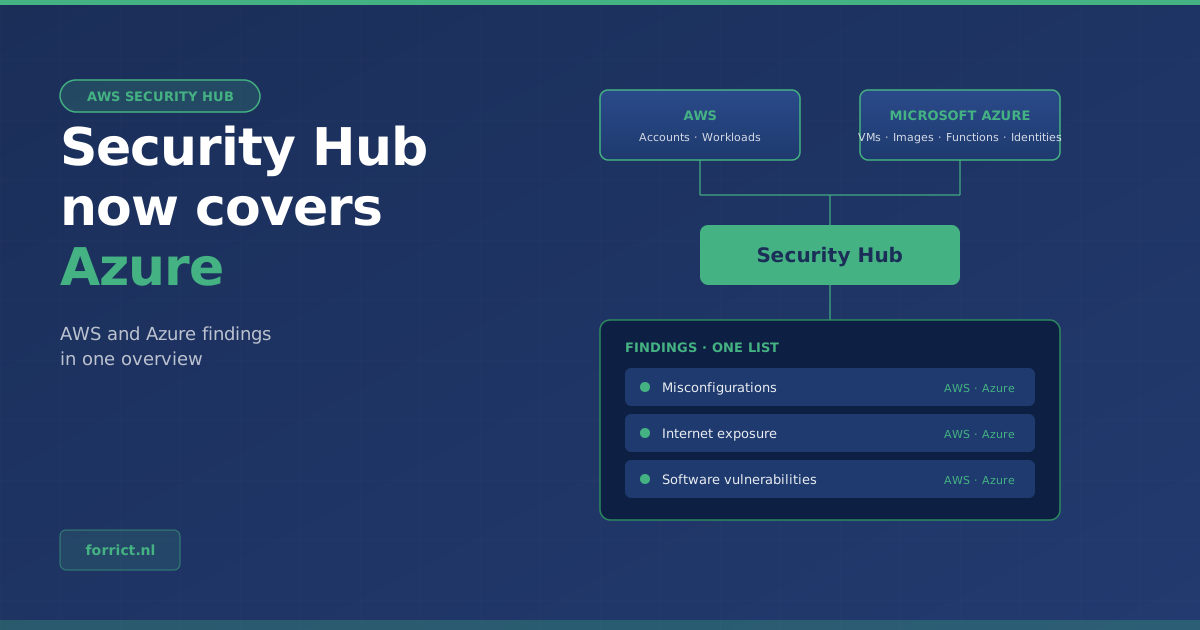
On 7 July 2026, AWS announced that Security Hub also monitors Microsoft Azure. Security Hub automatically discovers:
- Azure Virtual Machines
- container images in Azure Container Registry
- Azure Function Apps
- Azure identities
These resources are checked for misconfigurations, internet exposure and software vulnerabilities. Posture checks run against standards including the CIS Benchmark for Microsoft Azure Foundations.
According to the announcement on the AWS Security Blog, Azure findings arrive in the same format as AWS findings, with the same prioritization, automation and response workflows. So you look at one list.
What does it cost?
There is a 30-day free trial. It starts when you create the Azure integration and is independent of other trials. After that, Azure resources are billed at the same rate as equivalent AWS resources, with no additional fees.
Where is it available?
In all AWS Regions where Security Hub is available, except Middle East (UAE), Middle East (Bahrain), Asia Pacific (Taipei) and Asia Pacific (New Zealand).
Our view: what this means for SMBs
This section is Forrict’s opinion, not part of the announcement.
One overview beats two separate ones. Alerts spread across several consoles are less likely to be read. If you run on AWS and Azure, one list of findings, prioritized one way, is a real step forward.
Check what is and isn’t covered. The announcement is about Azure resources: virtual machines, container images, Function Apps and identities. Microsoft 365 is not mentioned. Workplace management with Microsoft 365 and Intune still needs its own attention.
Tools don’t replace the basics. Security Hub shows what’s wrong. It doesn’t fix it. The real gains are still in well-designed access rights, logging and clear separation between environments, in AWS and in Azure.
How to get started
- Check whether Security Hub is enabled in your AWS accounts.
- Create the Azure integration and use the 30 free days to see what comes up.
- Review the main findings together: which are real risks, and who fixes them?
- Decide after 30 days whether the overview is worth the cost.
Want to know where your environment stands? An AWS Security Assessment maps the risks and puts the improvements in order.
Talk to us about your cloud security →
Sources
- AWS What’s New, 7 July 2026: AWS Security Hub extends unified security management to Microsoft Azure
- AWS Security Blog, 14 July 2026: Security Hub adds AI workload protection and multicloud support for Microsoft Azure
Forrict
AWS expert and consultant at Forrict, specializing in cloud architecture and AWS best practices for Dutch businesses.