Microsoft Ignite started on 17 November 2026. Microsoft made a long list of announcements there, and a large share was about AI agents. For an SME running Microsoft 365, Intune and Windows laptops, the question is simpler: what changes for my workplace, and what can I use today?
Below are the announcements that matter most for that, with the status and source for each. After that, our view on what to do with them now.
Baseline security mode 2026 is generally available
The most important news for Microsoft 365 administrators. Baseline security mode (BSM) brings the security settings Microsoft recommends together in one place in the Microsoft 365 admin center. You see what’s already in order, and you can switch on the rest (Microsoft 365 Blog).
| What Microsoft says | |
|---|---|
| Status | Generally available, with a phased rollout across all supported Microsoft 365 cloud environments |
| New | 24 new settings and a new Applications category |
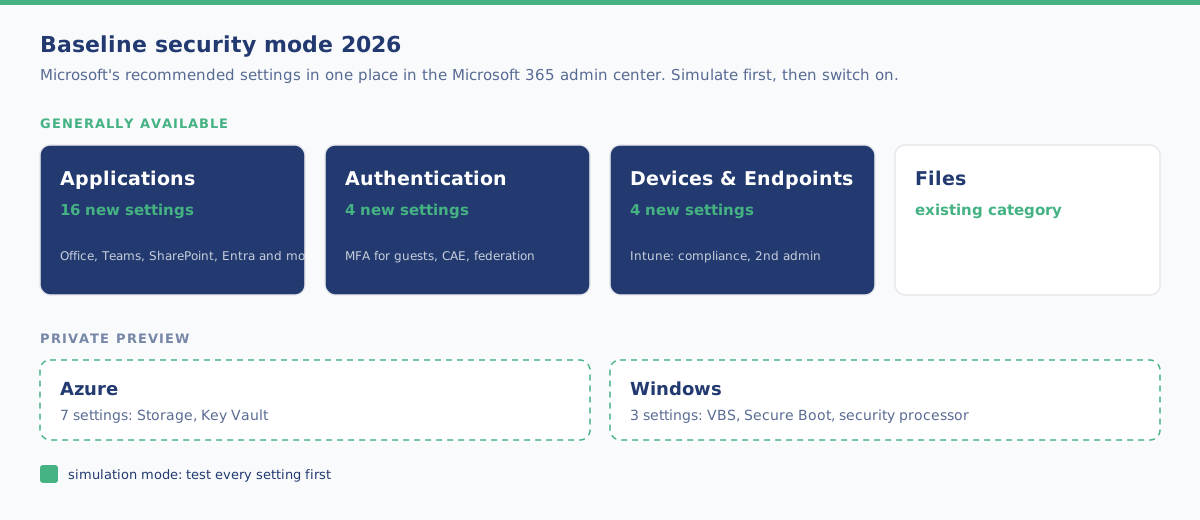
| Categories | Applications, Authentication, Devices & Endpoints and Files |
| Services | Office, SharePoint, Teams, Exchange and Entra, and now also Intune, Purview and Dynamics 365 |
| Testing | You can run each setting in simulation mode first to see the impact |
| Where | Microsoft 365 admin center → Org Settings → Security & Privacy → Baseline security mode (as Global Administrator) |
| New tenants | BSM 2025 will become the default configuration for all new Microsoft 365 tenants |
| Compliance | According to Microsoft, BSM does not guarantee compliance with any law or regulatory framework |
A selection of the new settings
| Category | Examples from the announcement |
|---|---|
| Applications (16) | Office blocks COM add-ins that aren’t on the admin allow list. External users wait in the Teams lobby. No new classic SharePoint pages |
| Authentication (4) | MFA required for guests and external users in Entra. Teams blocks federation with trial tenants |
| Devices & Endpoints (4, Intune) | Alert when a new device is enrolled. A compliance policy is required. A maximum number of devices per user. A second admin must approve sensitive actions |
| Azure (7, private preview) | Storage: secure transfer only, no anonymous public access, minimum TLS version, no Shared Key. Key Vault: restricted public access, purge protection, soft delete |
| Windows (3, private preview) | Virtualization-based security, Secure Boot and the security processor |
Some settings will be noticed by your users. External users get MFA, guests wait in the lobby and classic SharePoint pages can no longer be created or edited (existing pages stay viewable). The announcement doesn’t mention licensing requirements.
Windows security
From the Windows security blog of 17 November:
| Announcement | Status | What it is |
|---|---|---|
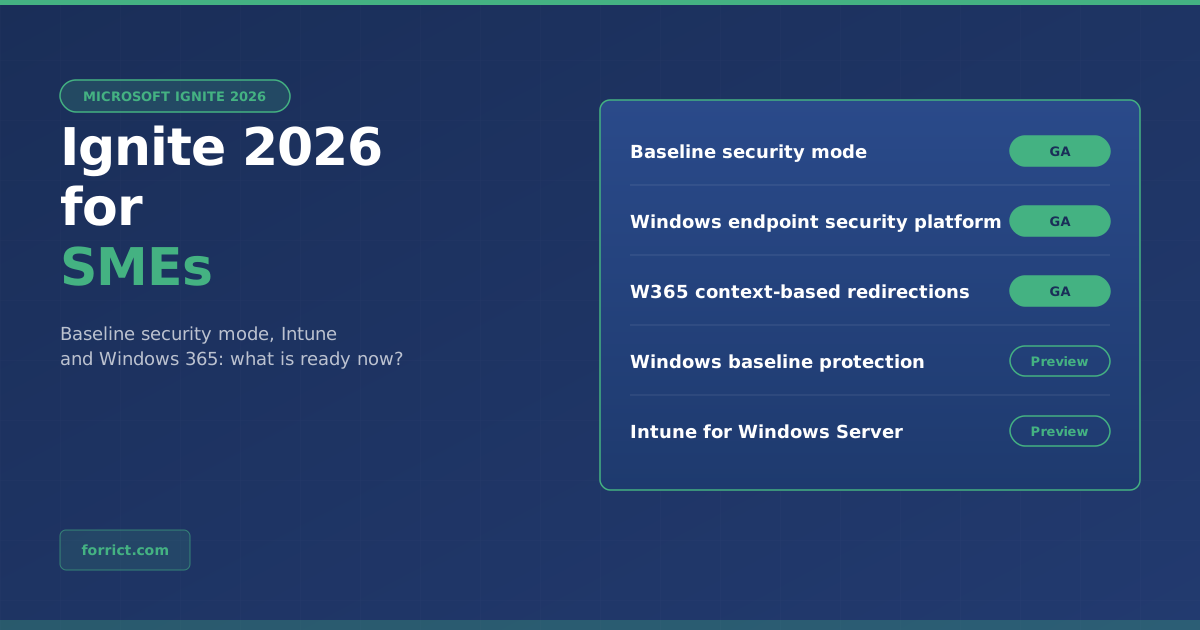
| Windows endpoint security platform | GA on Windows 11 | Security software relies less on kernel drivers, while keeping the capabilities it needs |
| Windows baseline protection | Preview | Secure Boot, virtualization-based security and memory integrity combined into one versioned security state, verifiable through hardware attestation |
| Intune and Windows Autopatch for Windows Server | Preview | Configuration, compliance, apps, updates and security for supported servers, alongside Windows clients |
| Administrator protection | Not stated | Users work without admin rights by default and only get them when needed |
According to the Book of News, Intune also gets declarative device management (preview) and automatic updates for all Windows apps through Enterprise App Management (private preview).
Windows 365
From the Windows 365 blog of 17 November. Note: the blog doesn’t mention Windows 365 Business. The announcements cover Enterprise, Flex, Reserve and Windows 365 for Agents.
| Announcement | Status | What it is |
|---|---|---|
| Monitoring and reporting | GA in Intune | Track connection health and configurations end to end |
| Context-based redirections | GA (also Azure Virtual Desktop) | Allow or block clipboard, drives, printers and USB based on the Entra authentication context |
| Output Protection | GA | Protects the display output from screen-capturing malware |
| Input Protection | Preview | Protects keyboard and mouse input from keyloggers |
| Windows 365 admin assistant | Public preview in Intune | An assistant in the Intune admin center, starting with connectivity troubleshooting |
| MAM for Windows App | Public preview | Protection of company data when accessing a Cloud PC from managed and unmanaged devices |
Our view: what should you do with this now?
This section is Forrict’s opinion, not part of the announcements.
Start with Baseline security mode. It’s generally available and pays off right away. You get a list of what Microsoft itself recommends, you see what’s still open in your tenant, and simulation mode shows you first who will be affected. For an SME tenant where nobody has ever really gone through the security settings, that’s a quick win.
Watch the settings your users will notice. MFA for external users and the Teams lobby are good, but tell your staff and regular external partners beforehand. Otherwise you’ll get the questions on the day itself.
The Intune settings are small but valuable. An alert for a new device, a maximum per user and a second admin for sensitive actions: exactly what you want when an account gets taken over. They fit the baseline we put in place with workplace management.
Previews: follow, don’t roll out. Windows baseline protection, Intune for Windows Server and the Windows 365 admin assistant are interesting, but still in preview. At most, test them on a few devices.
AI agents: not now. A large part of Ignite was about agents (Agent 365, Windows 365 for Agents). For most SMEs, the basics above come first. Agents become relevant once you actually start using them.
Using Azure too? The Azure settings in BSM (Storage and Key Vault) are still in private preview. If you want them in order now, you can do that with Azure Policy. We do that as part of our Azure services.
How to approach it
- In the Microsoft 365 admin center, open Org Settings → Security & Privacy → Baseline security mode and check which settings aren’t on yet.
- Put the new settings in simulation mode first and watch for a week who is affected.
- Inform staff and regular external partners about MFA for guests and the Teams lobby.
- Then switch the settings on per category, starting with Authentication and Devices & Endpoints.
- Keep an eye on the Windows and Windows 365 previews, and test them on a few devices once they’re generally available.
Want someone to take care of this for you? With workplace management we set up Microsoft 365, Intune and the security of your workplace and keep it up to date.
Get in touch about your workplace management →
Sources
- Microsoft 365 Blog, 17 November 2026: Ignite’26 Spotlight: Announcing Microsoft Baseline security mode 2026 General Availability
- Windows Experience Blog, 17 November 2026: Windows security at Ignite 2026: Start secure, protect what matters, prepare for AI
- Windows IT Pro Blog, 17 November 2026: Windows 365 at Ignite 2026: Introducing new Cloud PC capabilities for people, agents and IT
- Microsoft: Microsoft Ignite 2026 Book of News
Forrict
AWS expert and consultant at Forrict, specializing in cloud architecture and AWS best practices for Dutch businesses.